
Modules and their grants
An agent can do whatever its tools can. In pcx every tool belongs to a module, and a module can do only what it was given: a person grants it, the host checks every call, and the machine under it refuses the rest.
An agent with tools is an agent with keys
Section titled “An agent with tools is an agent with keys”The usual MCP server is a process started with the user’s rights: it sees all of their files, their network and their environment, with the keys in it. The agent that calls it can do everything the user can. One wrong step, or one text that misleads the model (prompt injection), and there is no boundary: only trust that the tool will behave.
In pcx every tool is part of a module, and the module can do only what it was given. It does not say so itself: a person gives it, and the host checks every call.
Example: an agent looking for a way around
Section titled “Example: an agent looking for a way around”On November 1 we asked the workflow builder agent for a workflow that counts the boards of a workspace. In this first try the agent had not been given the workflow tools yet, so it went looking for another way in:
- it tried to list the machine’s root and its own home directory;
- it looked for a
pcxcommand line,grpcurlandcurl, to call the server directly; - it searched the code for the workflow tools, and looked for a ready program in the build directory.
None of it worked:
- the root could not even be listed: its sandbox sees only its working directory and the system paths a program needs to start;
- none of those programs was there: what it may run comes from the module’s settings, not from the machine;
- the tools it was not given were simply not in its list, and there is no other way to them.
A person stopped the turn. Nothing had been changed. In the second try, given the workflow tools, the same agent made the workflow, checked it, ran it dry and left it waiting for a person to approve what it may call. That is on the Workflows page.
What a module is
Section titled “What a module is”A module is a program the host starts. It declares:
- its tools, each with an effect: it only reads, it writes, or it acts outside (sends mail, calls someone else’s API);
- the grants it asks for: to write to memory, to read conversations, the network, files (naming the exact directories), starting processes, models;
- the modules it uses: memory, the board, git, and so on;
- its settings, from which the app builds a form; the secrets in them (keys, passwords) are stored and never shown again.
The host refuses a module that asks for more than its configuration gives, and checks every call again while it runs.
What each module may do in the cloud
Section titled “What each module may do in the cloud”From the catalog of the pcx cloud, November 10, 2026:
| Module | What it does | Grants | Uses |
|---|---|---|---|
| Board | tasks and decisions on boards | writes to memory | memory, git |
| Skills | a library of skills for the agents | writes to memory | memory |
| sends mail through the organization’s own transport | writes to memory, network | memory | |
| HTTP | calls outside APIs through connections that keep the keys | writes to memory, network | memory |
| Models | the model providers: OpenRouter, Anthropic, Z.AI, OpenAI | network | nothing |
| Workflow | graphs of steps over the tools of the modules | writes to memory, models | every module, within what a person approved for each workflow |
The board has no network: it cannot send anything out, whatever the agent hands it. Mail has the network, but uses only memory: it cannot touch the board or the files.
The agent, the team and the chief use almost every module, and a workflow every one, because that is their job: to call the others. For them the boundary sits further in: what a person approved for each workflow, and the tools of each member of a team.
The sandbox
Section titled “The sandbox”Every file a module opens and every process it starts goes through the host’s sandbox, with the grants of that module. The module cannot widen them.
- Files: only in the directories its configuration gives, each readable, or readable and writable.
..above the directory, an absolute path elsewhere and a symlink pointing out are refused, with no window between the check and the open. - Processes: under the operating system’s sandbox: Seatbelt on macOS, Landlock and seccomp on Linux, a jail of its own for each module on FreeBSD. The network only with the network grant.
- The network in the cloud: every module runs as an unprivileged sandbox user, by default with 256 MB of memory and 1,024 open files, and the machine’s firewall gives that user nothing inside: not the loopback, not the machine itself, not the private ranges, not link-local. Only public addresses, and only for the modules with the network grant (HTTP, Mail, Models).
- The environment: a process gets only what its call names, and a scratch directory of its own.
~/.gitconfigand the machine’s keys are out of reach, and a commit an agent makes names the agent, never a person. - No sandbox, no access: there is a sandbox on macOS, Linux and FreeBSD; on any other system every file or process call is refused, instead of running unprotected.
Example: an address that looks outside
Section titled “Example: an address that looks outside”The HTTP module has the network: that is its job. But it does not reach everything that has an address. A test workflow of ours calls two APIs. The first, GitHub, answers in a second. The second is localtest.me, a name that looks like an outside site and points at the machine itself:
denied: url localtest.me resolves to ::1,which is not reached from here(private, loopback, link-local or reserved)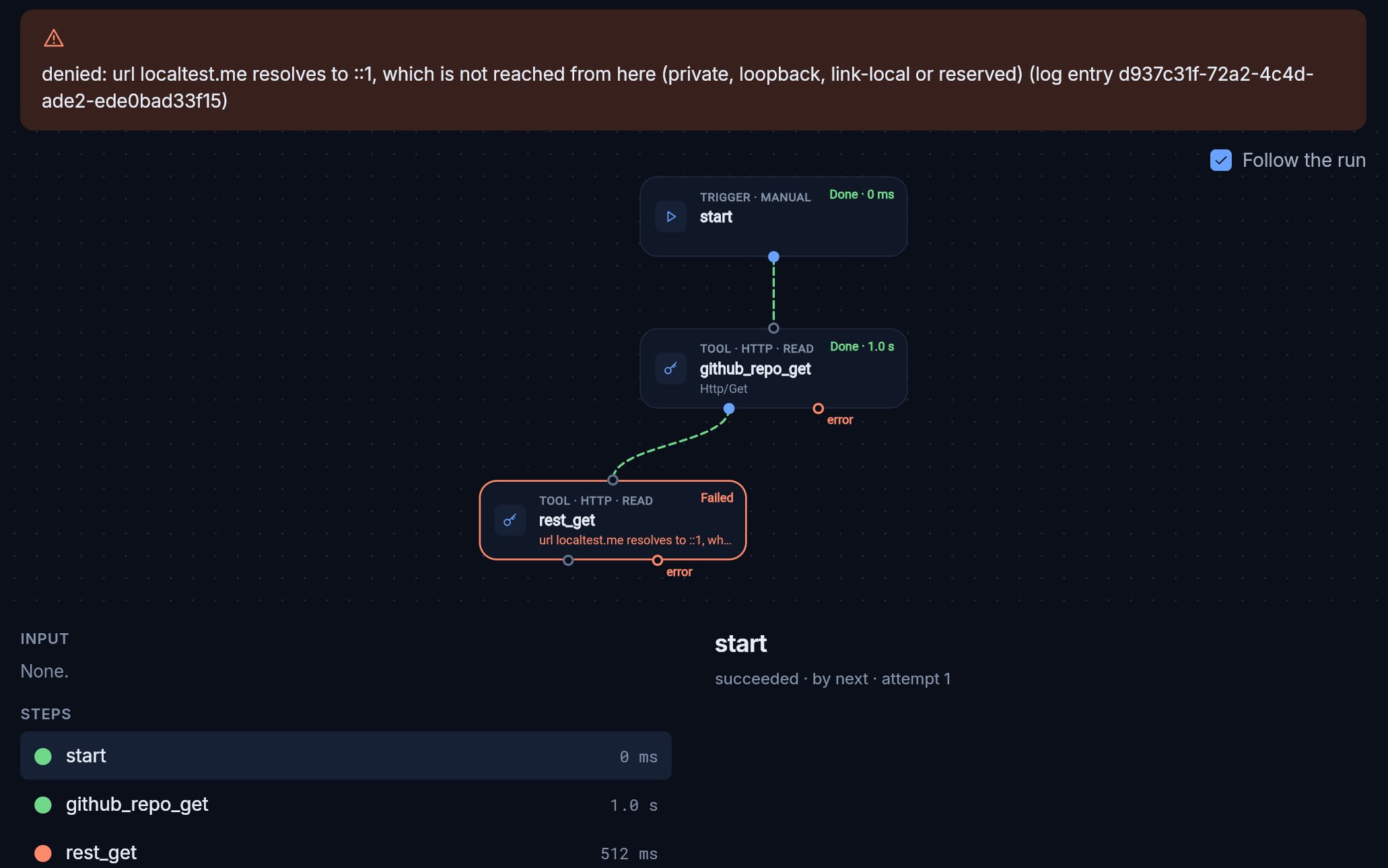
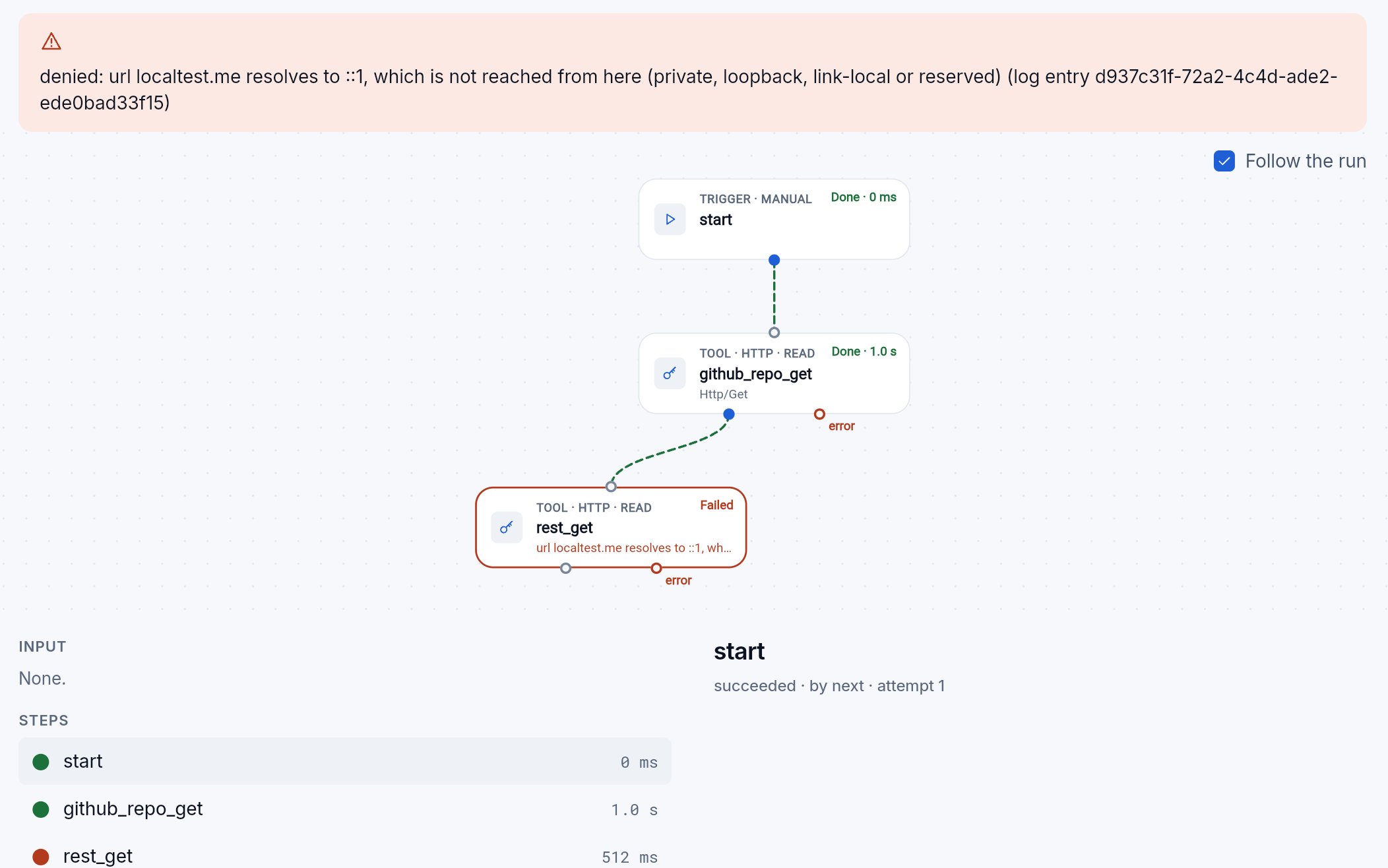
The module checks not the name but the address it reaches, and refuses the inside ones: localhost, the private ranges, link-local (where clouds keep the keys of their machines) and the reserved ones, unless a person allows private networks in its settings. The refusal is in the module’s log and in the workflow’s step.
So a misled agent cannot make HTTP reach into the inside network through a name that looks harmless. In the cloud this is the second wall: even if the module let the request go, the machine refuses the sandbox user a connection to an inside address. The same holds for a library that opens its own connection around the module’s rules.
A module written by an agent
Section titled “A module written by an agent”A module in Python or TypeScript can be installed while the host runs (a custom module), and an agent often writes it. So it gets less than any built-in one, on every host:
- no network: it has no address of its own; it reaches outside only through the HTTP module, with its connections, rules and log;
- no processes and no files: files reach it only through the modules that serve them;
- no settings of its own, and it installs no modules;
- pinned: its package is checked by its hash when it is unpacked, and mounted read-only;
- bounded: 256 MB of memory by default; past that it is stopped, and the error says why.
Each version of such a module first runs once locked down, with nothing, and waits for a person to approve it.
The module asks, a person decides
Section titled “The module asks, a person decides”An agent does not give grants. When an agent makes a workflow, the workflow asks for what it may call, and it does not run until a person approves that on the board. If it later changes and asks for more, it waits for a new approval. The agent cannot approve its own request: the request is made in the workflow’s own name, which decides nothing.
Limits
Section titled “Limits”- A grant does not name addresses. The network grant gives all public addresses, not a list such as
smtp.example.com:465: where Mail sends and where HTTP calls is the organization’s own setting. Inside addresses are blocked in the cloud; on a daemon under Linux or macOS a module’s network is all or nothing, and there only the rules of HTTP guard it.
What it solves
Section titled “What it solves”- A wrong step does not get far. The agent can do only what the tools of its modules can, and a module only what it was given.
- A misled model has nowhere to go. The board sends no mail, mail reads no files, nobody sees the machine’s keys.
- Grants are visible. Every module shows what it asks for and what it was given, in the app and in the configuration; every change is in the audit log.
- A person approves what acts outside. A workflow that calls other modules runs only after a person approves exactly what it may call.